agendessa



























Agendessa on Google Play: your bookings and clients on your phone
Your working day does not happen at a desk, it happens between appointments. That is why your calendar, client records and AI receptionist conversations are now on your Android phone too.
AThe Agendessa team
In short
- The mobile app is available on Google Play, for Android phones and tablets.
- You sign in with your business account and the data matches the dashboard on your computer.
- Move appointments by dragging them and open client records with before and after photos.
- Read the AI receptionist's conversations and take over when a person is needed.
Why a mobile app
In a salon or a clinic, the working day does not happen at a desk. It happens at the chair, at reception, between two clients or on the way home. Until now, to see who was next or to move an appointment, you had to open the dashboard in a browser. From today, it all fits in your pocket.
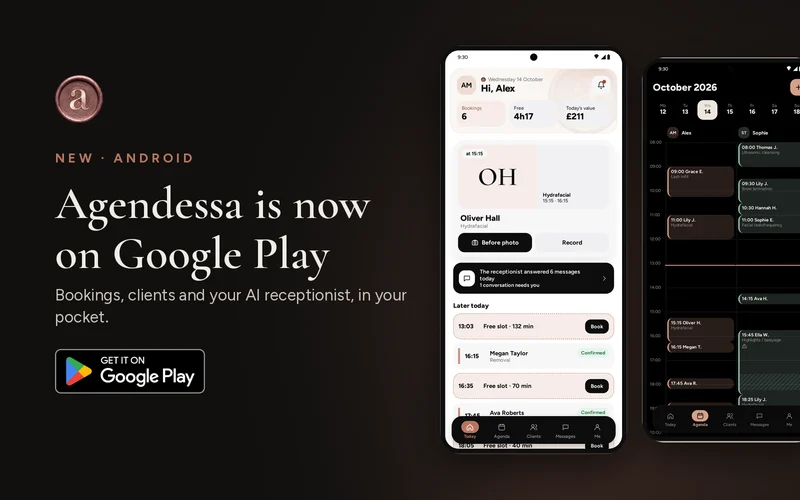
The mobile app of the booking software is available on Google Play, for Android phones and tablets. You sign in with the same account your business already uses, and the data is the same: appointments, clients and conversations stay in sync with the dashboard on your computer.
It is not a separate program and you do not need to move anything. What you change on the phone shows up straight away on the computer, at reception and for your colleagues, and the other way round. Each colleague only sees what their role allows, so you can give the whole team access with peace of mind.
The Today screen: your day at a glance
The first screen shows what matters in the next few hours: your next client, the appointments left for today, the gaps in your schedule and the value of the day. One look tells you whether you have time for a coffee or need to hurry.
Here you also see what the AI receptionist handled while you were working: how many messages came in, how many appointments it booked and whether a conversation is waiting for you. After closing time, the screen switches to tomorrow on its own, so you can prepare in advance.
For a barber with a full diary or a beautician who works alone, that means fewer phone calls taken in a rush and fewer notes stuck to the mirror. The whole day is on a single screen.
The team calendar, moved with your finger
The calendar shows one column for each colleague, day by day. If a client is running late or asks for another time, you press and hold the appointment and drag it to the right time or colleague. Tap a free slot and you add a new appointment.
A new appointment takes a few seconds: search for the client or add a new one, choose the service and a free time. Processing times between steps and resources such as a treatment room or a machine are worked out for you, so two jobs never overlap.
When you open an appointment, you see the services, the alerts and the total. You mark that the client has arrived, record how they paid at reception, mark a no‑show or cancel, without going back to the computer.
Client records, with before and after photos
Every client has a record: visit history, notes, alerts such as allergies and before and after photos. You take the photos with your phone camera during the visit, and they stay in the record for next time.
This matters most for colour, extensions or facial treatments, where results show over time. Next time you open the record and know exactly which shade you used and how the hair looked before.
From the record you can call the client with a single tap. If you need to move an appointment or confirm a time, you no longer have to search for the number in your phone contacts.
The AI receptionist, in your pocket
If you use the AI receptionist, the app shows every conversation it has with your clients. For calls you get the duration, a short summary, the transcript and the recording, so you can hear exactly what was said.
When a conversation needs a person, for example an unusual question or a complaint, you take it over with one tap and reply yourself. When you are done, you hand it back to the receptionist, which carries on where you left off.
You choose your notifications: new and online appointments, cancellations, moved appointments, messages handed over by the receptionist and missed calls. You only get what matters to you, not dozens of alerts a day.
How to get started
Search for “Agendessa” on Google Play or open the link in this article, install the app and sign in with the email and password of your business account. The owner creates the account and invites the team; each colleague signs in with their own details.
The app opens with your fingerprint or face, offers a White or Night theme and works in 30 languages. From the Me screen you change your password and profile photo, contact support or delete your account.
If you do not have an account yet, create one on Agendessa.com; the software comes with the first 30 days free, no card needed. Once your services and team are set up, the app puts your whole business on your phone.
Frequently asked questions
Does the app cost anything?
The app is free to download from Google Play. It works with an existing business account, and the software comes with the first 30 days free, no card needed.
Do I need to move my data?
No. You sign in with the same account, and appointments, clients and conversations sync automatically with the dashboard on your computer.
Can I use the app on a tablet?
Yes, the app works on Android phones and tablets, so you can also use it at reception.
What does a team member see?
Each colleague signs in with their own details and only sees what the role set by the owner allows.