agendessa






























Plumber
Scheduling software for plumbers
With your hands in a pipe you cannot answer the phone, so the customer calls someone else. With Agendessa customers book themselves, with address and issue noted, and you get travel time between jobs.
What you get on day one
Starter services for plumber. Times and prices are examples you can change any time.
- On-site assessment45 min£26
- Drain unblocking60 minfrom £42
- Leak / tap repair60 minfrom £34
- Tap / sanitaryware installation60 minfrom £34
- Water heater installation120 minfrom £70
- Out-of-hours emergency60 minfrom £70
The client card for Plumber
Fields that appear on the card for your trade, alongside phone, email, notes and history.
- Service address
- Access / intercom / floor
- Reported issue
Rules ready to go
- 30 minutes between jobs for travel. Change it in Settings.
A day at a plumbing business with Agendessa
- 1
Jobs booked online
The customer picks what needs fixing and a suitable time, and you see the booking in the calendar.
- 2
The address on the booking
The job address shows on the booking, with a Google Maps link.
- 3
Travel time between jobs
Set a break after every job so you reach the next customer on time.
- 4
Know what to expect
The reported issue and access details (buzzer, floor) are on file before you leave.
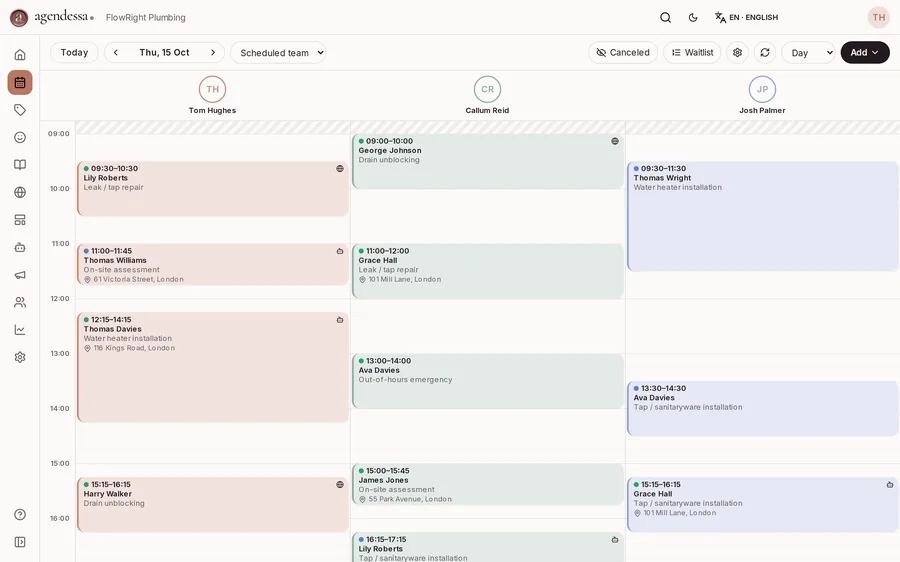
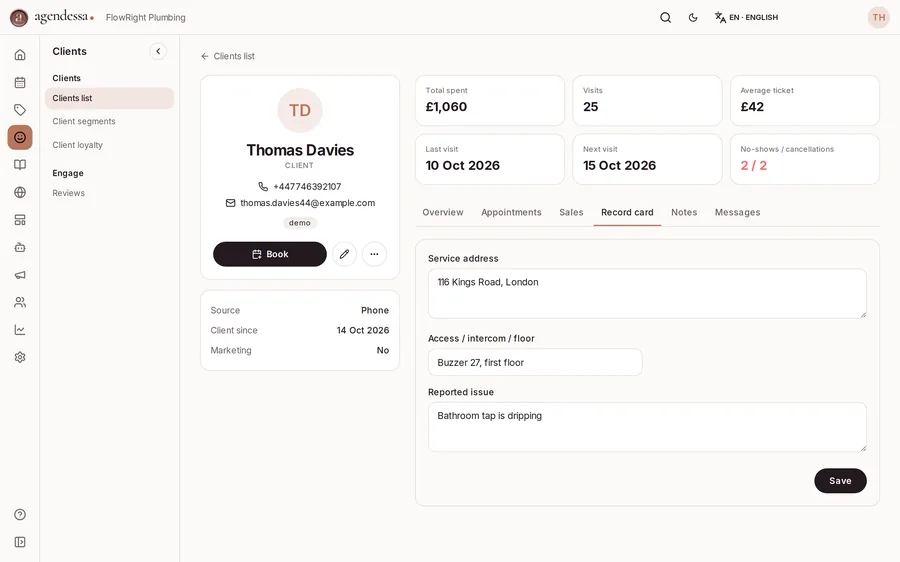
Real screenshots from Agendessa demo accounts.
How you work with Agendessa
Online booking, even while you work
The customer picks drain unblocking, a tap repair or a water heater installation and a free time from their phone. They leave the address and describe what broke.
The address on the booking
The service address, intercom and floor show on the booking, with an “Open in Google Maps” link. No more digging through messages to find where you are going.
Travel time between jobs
After every job the calendar keeps 30 minutes for travel. You change the break in Settings, to suit the area you cover.
Know the problem before you leave
The issue the customer reported is on the record, so you take the right parts first time. Customers get a reminder beforehand and can cancel from the link.
Free tools for appointment businesses
Frequently asked questions
Does it do quotes or keep parts stock?
No. Agendessa handles bookings, the customer record and payments. Quotes and parts stock stay in your own software or notebook.
Can I take out-of-hours emergencies?
Yes, if you want them. There is an “Out-of-hours emergency” service with your own price, and you decide which hours it shows as free in online booking.
Does it plan the shortest route between customers?
No. It does not optimise routes or track the plumber on a map. It shows each booking's address with a Google Maps link and keeps travel time between jobs.
Can I work with several plumbers?
Yes. Each plumber has their own hours and jobs, and the customer can choose a specific person or the first free time.
Does the AI receptionist answer while I am on a job?
If you switch it on, yes. It answers the phone, WhatsApp and your website chat while you are on a job, checks real free times and books straight into the calendar.


Can't find your industry? Tell us and we will add it to Agendessa.
Tell us your industryStart in a few minutes
Free sign up, no card needed. The services for your trade are already set up.