agendessa


























Agendessa on the App Store: the iPhone app is here
After Google Play, the Agendessa app is now on the App Store too. Your agenda, client records and AI receptionist conversations are now on iPhone.
AThe Agendessa team
In short
- The Agendessa app is available on the App Store for iPhone and iPad, and on Google Play for Android.
- You sign in with your business account, and the data is the same as in the dashboard on your computer.
- It unlocks with Face ID or Touch ID and works in 30 languages.
- The app is free to download; the first 30 days are free, no card required.
Now on iPhone too
We launched the mobile app on Google Play in October, and from today you will also find it on the App Store, for iPhone and iPad. Whatever phone you or your team use, everyone can work from the same app.
You sign in with the account your business already uses. Bookings, clients and conversations stay in sync with the dashboard on your computer, so there is nothing to move and nothing to set up from scratch.
Whatever you change on your phone shows up straight away on the computer, at the front desk and for your colleagues, and the other way round. Each team member only sees what their role allows.
What you can do in the app
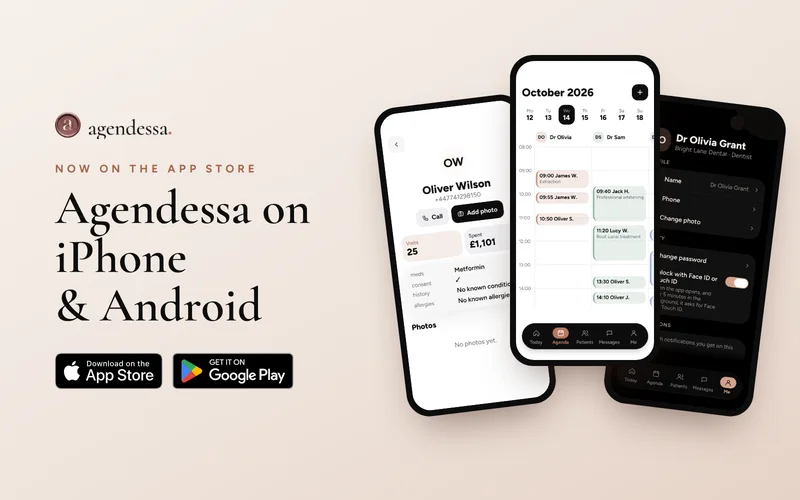
The Today screen sums up your day: the next client, the bookings left, the gaps in your schedule and the value of the day. The agenda has a column for each team member; to move a booking, press and hold it and drag it to another time or colleague.
Each client record holds the visit history, notes, alerts and before and after photos taken with your phone camera. You can call a client with one tap from their record.
If you use the AI receptionist, you see every conversation it has: for calls you get the summary, transcript and recording. When a person is needed, you take over with one tap and hand the conversation back when you are done.
Made for iPhone
The app unlocks with Face ID or Touch ID, comes in a White or Night theme and works in 30 languages. You choose your notifications: new and online bookings, cancellations, moved bookings, messages handed over by the receptionist and missed calls.
On iPad, the app works well at the front desk: you see the day's agenda on a large screen, and clients can sign forms right on the tablet.
How to start
Search for “Agendessa” on the App Store or Google Play, install the app and sign in with your business email and password. The owner creates the account and invites the team; each team member signs in with their own details.
If you don't have an account yet, create one at Agendessa.com. The first 30 days are free with no card required, and the app is free to download.
Frequently asked questions
Does the app cost anything?
The app is free to download from the App Store and Google Play. It works with your business account, and the first 30 days are free, no card required.
Can I use the app on iPad?
Yes, the app works on iPhone and iPad, so you can use it at the front desk too.
Can colleagues with Android use the same app?
Yes. The app is also on Google Play, and the whole team works in the same account whatever phone they use.
Do I need to move my data?
No. You sign in with the same account, and bookings, clients and conversations sync automatically.